Introducing LinguaX: Native Mac Mouse Enhancement

If your third-party mouse feels rough on macOS — jumpy scrolling, dead side buttons, no real driver — LinguaX fixes it. LinguaX is a lightweight, native macOS mouse enhancement app that gives any USB or Bluetooth mouse trackpad-grade scrolling, real button and gesture mappings, and per-app behavior, all without installing a kernel driver.
It is under 5MB, fully native (no Electron), keeps every setting on your Mac (no account, no telemetry), and works as a lightweight Logi Options+ alternative. Alongside the mouse tools, LinguaX has a second core capability: it automates macOS input-source switching for multilingual users.
Why macOS Mice Need Help
macOS treats third-party mice as second-class citizens. The result is familiar to anyone who has plugged in an MX Master or a G502:
- Scrolling moves in coarse notches instead of gliding like a trackpad
- Side buttons, wheel tilt, and thumb buttons do nothing useful out of the box
- Pointer speed and acceleration can't be tuned the way you want
- The only "fix" is a heavyweight vendor driver — if one exists for your model at all
LinguaX solves these at the system level, in one small app.
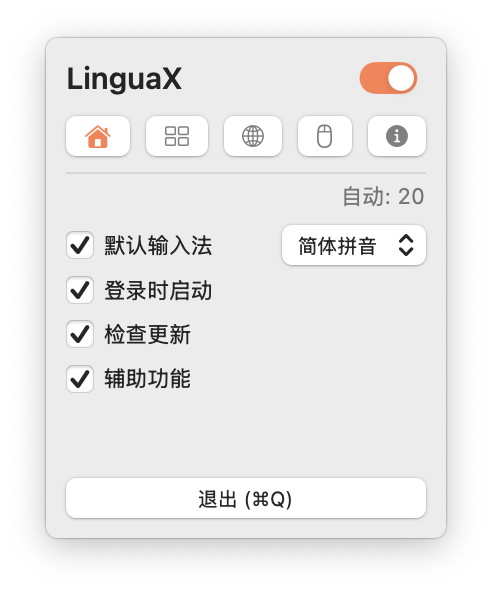
What LinguaX Does
Smooth Scrolling
LinguaX intercepts the coarse, notch-by-notch scroll signal from third-party mice and replays it along a tunable smooth curve, so long pages and code feel as fluid as a trackpad.
Three global controls shape the feel:
- Min Step — the minimum distance each scroll covers (default 33.6). Lower it for precise line-by-line reading in code; raise it to move faster through long documents.
- Speed Gain — how much momentum builds as you keep scrolling (default 2.70).
- Duration — how long the glide-and-settle motion lasts after each notch (default 4.35). Longer feels more trackpad-like; shorter feels tighter and more immediate.
Smoothing applies to the mouse wheel only — trackpad scrolling is passed through untouched — and holding any modifier key (⌘⌥⌃⇧ or Fn) pauses it. Two independent global switches, Reverse Vertical Scroll and Reverse Horizontal Scroll, let a connected mouse scroll in the "traditional" direction while your trackpad keeps natural scrolling. If smoothing ever feels like too much in one specific app, you can turn it off there without touching your global setting. See Smooth Scrolling and the guide to fixing choppy mouse scrolling.
Button & Gesture Mapping
Map side buttons, wheel tilt, and thumb buttons to real actions — app launches, system controls, media playback, window management, or any keyboard shortcut. Beyond a simple click, LinguaX distinguishes several trigger types on the same button:
- Click — the standard single press.
- Long-press — hold the button to fire a second action, doubling what a single button can do.
- Directional drag / swipe — hold a side button and drag up, down, left, or right to trigger up to four different actions, with an on-screen mode indicator showing what you're about to fire.
- Modifier-hold — holds the Fn (Globe) key down only while the button is pressed and releases it the instant you let go. Because holding Fn triggers macOS Dictation, this gives you a true push-to-talk voice-typing button.
Common bindings include back/forward navigation, switching Spaces, mission control, volume and media playback, and arbitrary keyboard shortcuts. See Button Mapping, Gesture Mapping, and the push-to-talk voice typing guide.
Per-App Behavior
A browser and a code editor rarely want the same button layout, and some apps scroll better with smoothing off entirely. LinguaX lets each app override the Smooth Scroll toggle and carry its own gestures and button map. In practice that means smoothing can stay on in your browser but off in an app that scrolls better raw, and a side button can mean "back" in Safari but "switch Space" in your editor. (The scroll tuning — Min Step, Speed Gain, Duration — and reverse-direction switches are global.) The running-apps list refreshes automatically as apps launch and quit, so adding a new per-app override takes seconds. See App-Scoped Overrides.
Pointer Speed (Feel Adjustment)
Fine-tune the Pointer Speed slider to get tracking that lands where you expect, applied instantly through a low-level system path — useful for design work and gaming where consistent, predictable cursor movement matters more than the macOS default. The setting is saved per device, so each mouse keeps its own feel. See Pointer Speed & Acceleration and How to Disable Mouse Acceleration on macOS.
A Lightweight Logi Options+ Alternative
LinguaX gives recognized mice — MX Master series, G502 (including the G502 X), M720, M585, and more — accurate model detection and sensible default mappings, so a freshly connected mouse often works the way you'd expect with little manual setup. There's no account, no background updater, and nothing to install at the kernel level. See Logi Options+ Alternative for macOS, the MX Master 3S setup guide, and Device Compatibility.
The Other Half: Automatic Input-Source Switching
Input-source automation is a full, first-class module in LinguaX, not an afterthought. It can switch your input source automatically based on the app you're in (English in Terminal, your native language in chat) and even per website host in the browser.
- Automatic switching by application
- Per-website rules for browsers, resolved by URL host
- A sensible fallback default input source
Rules resolve in a clear priority order — a matching website domain rule wins over an app rule, which wins over the default. Domain-based switching needs accessibility permission so LinguaX can read the current URL, and it covers Safari, Chrome, Edge, Brave, and Opera (Firefox doesn't expose its URL for this, so domain rules don't apply there — app rules still do). So if you type across languages, you get a mouse upgrade and an input-method assistant in one app. See Input-Source Auto-Switch and App & Website Rules.
Why Native & Lightweight Matters
- Under 5MB, fully native. No Electron, no bundled browser engine, no background bloat.
- No account, no telemetry. Configuration stays on your Mac; nothing is sent anywhere.
- Driverless. Nothing installs at the system level — uninstalling is just deleting the app.
- Reliable across sleep/wake. Bluetooth devices recover automatically after sleep.
Who Benefits Most
LinguaX earns its place for anyone who spends the day with a third-party mouse, but a few groups feel the difference immediately.
Developers and Power Users
Reading and reviewing code means scrolling through thousands of lines a day — smooth scrolling alone changes how that feels. Map a thumb button to switch Spaces between editor, terminal, and browser; bind side buttons to back/forward through your symbol history and docs; and use wheel tilt for horizontal scrolling across wide diffs. Add automatic English input in the terminal so git status never turns into a string of CJK characters. See the developer setup workflow and our developer-focused guide.
Designers and Creators
Give Figma, Photoshop, and your browser their own button maps and per-app smooth-scroll toggle, put zoom or undo on a gesture, and dial in Pointer Speed for the cursor precision that pixel work demands. See the designer setup workflow.
MX Master and G502 Owners
If you bought a premium mouse but don't want the weight of a full vendor suite, LinguaX recognizes the model and applies sensible defaults without an account or driver — a genuine Logi Options+ alternative.
Multilingual Professionals
Let LinguaX handle input-source switching across apps and websites while it also tames your mouse, so you stop reaching for ⌘ + Space dozens of times a day.
System Requirements
LinguaX works with:
- macOS 13.0 Ventura and later
- Intel and Apple Silicon Macs (M1, M2, M3, M4)
- Any USB or Bluetooth mouse, with enhanced recognition for popular Logitech models
Getting Started
- Download LinguaX from the official website
- Drag it to Applications — no installer, no driver
- Grant accessibility permission so it can enhance mouse events
- Plug in your mouse — LinguaX enhances it in place
See Installation and First Run.
Pricing
LinguaX is a one-time purchase: $9.9 for a lifetime license covering 3 devices, with a 30-day free trial that unlocks the full app — no account and no credit card required to try it.
Frequently Asked Questions
Q: Do I need a specific mouse? A: No. LinguaX works with any USB or Bluetooth mouse, and adds enhanced recognition and default mappings for popular models like the MX Master series and G502.
Q: Does LinguaX replace Logi Options+? A: For most everyday needs — smooth scrolling, button and gesture mapping, pointer tuning — yes, in a fraction of the size and with no account. See the Logi Options+ alternative guide.
Q: Is the input-method switching still included? A: Yes. Automatic input-source switching by app and website is a built-in feature alongside the mouse tools.
Q: Will LinguaX slow down my Mac? A: No. It's under 5MB, uses minimal CPU, and runs as a single native menu-bar app — not an Electron wrapper with a bundled browser engine.
Q: Does it need a kernel driver or system extension? A: No. LinguaX works through standard accessibility permissions, so nothing installs at the kernel level. Uninstalling is just dragging the app to the Trash. See Permissions on macOS.
Q: Will my settings survive sleep, restarts, and macOS upgrades? A: Yes. Configuration is stored locally and synced automatically across your Macs via iCloud (CloudKit) — there's no manual export/import step — Bluetooth devices recover automatically after sleep, and licensing stays valid across macOS upgrades.
Q: Can different apps have different mouse behavior? A: Yes. Per-app overrides let each application toggle smooth scrolling on or off and carry its own gestures and button map. The scroll tuning (Min Step, Speed Gain, Duration) and reverse-direction switches are global. See App-Scoped Overrides.
Questions about mouse enhancement or input-source switching? Contact us at hello@linguax.app or follow us on X.