macOS 27.3 Beta Permissions: LinguaX Guide

macOS 27.3 beta 2 changes the way some of the most sensitive Mac permissions are presented. Apple is making app control more explicit, allowing users to limit access to specific apps or folders, and adding a visible indicator when an app controls another app.
The change is already showing up in real-world reports. The screenshot above comes from a community discussion about Logi Options+ accessibility permissions not being recognized on macOS 27.3 beta 2. The report is about Logitech's software rather than LinguaX, but it is a useful example of the transition: a permission can appear enabled while the app still cannot complete the operation it needs.
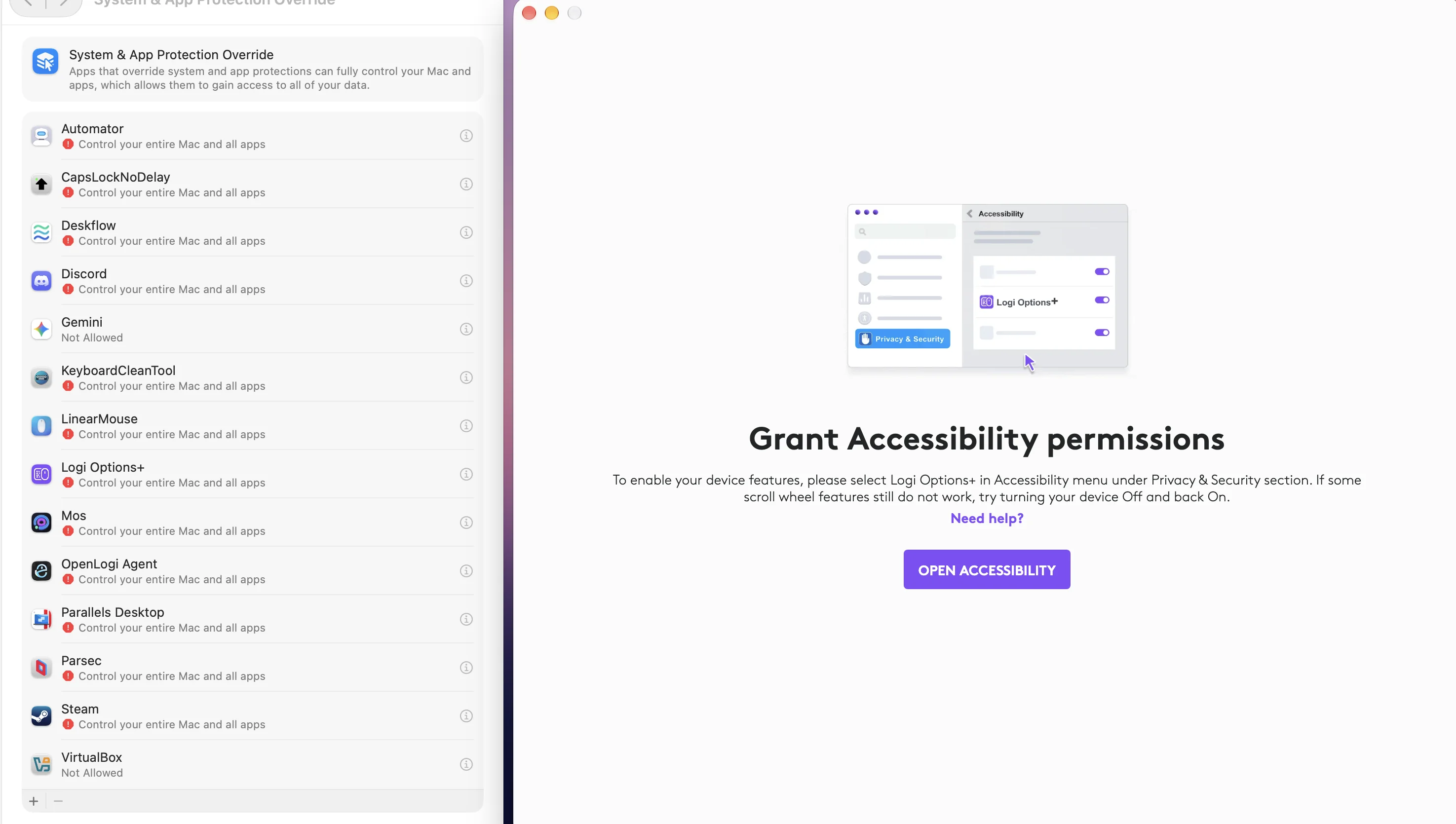
A community report showing the permission state and workaround discussion on macOS 27.3 beta 2.
What Apple changed in macOS 27.3 beta 2
Apple's macOS 27.3 beta 2 release notes describe the change under Privacy & Security. The old Device Control and Data Access setting is split into System & App Protection Override and Accessibility.
The new flow can also grant a narrower scope. A user may select the specific apps an automation tool can control, or the folders an app can access, instead of giving it unrestricted access. macOS can also ask for approval every time an app needs access and show a menu bar indicator while one app controls another.
Apple says that permissions granted before macOS 27.3 remain in effect. New permission requests are where the new UI and narrower choices appear. Developers are expected to handle limited access gracefully during onboarding and in normal operation.
MacRumors' report explains the change in practical terms: the update is motivated partly by the risk of AI agents receiving broad control, but the new permission model also affects ordinary automation, accessibility, mouse, keyboard, and productivity tools.
Why Logitech users are seeing permission failures
The community report shows a familiar pattern: Logitech Options+ has the required permissions enabled, but the app still reports that access is unavailable. Logitech's current macOS permissions guide still documents the older permission names for some flows and recommends quitting and reopening the app after granting Input Monitoring.
One community workaround is to add the Options+ application manually from the new System & App Protection Override page, then restart the app. That may help a beta installation, but it is not an official fix and it should not be copied blindly to another application. Each app has its own bundle identity and permission needs.
What this means for LinguaX
LinguaX uses two macOS permissions for its core workflows:
- Accessibility supports the mouse event tap, smooth scrolling, pointer and keyboard actions, and browser context access used by website rules.
- Input Monitoring supports HID device management.
LinguaX does not require Full Disk Access. The macOS 27.3 Full Disk Access changes do not mean that LinguaX needs access to your entire disk, and granting it would be unnecessary for the features LinguaX provides.
On macOS 27.3 beta 2, some operations that control another app may be presented through System & App Protection Override. If a browser action is denied even though LinguaX appears enabled, check whether the browser is included in the allowed target apps. Website rules may also need a fresh browser permission decision after an app update or a system upgrade.
A practical recovery flow on the beta
If a LinguaX feature stops working after upgrading to macOS 27.3 beta 2:
- Quit LinguaX completely.
- Open System Settings → Privacy & Security and review Accessibility, Input Monitoring, and, if shown for the affected operation, System & App Protection Override.
- Remove the LinguaX entry with the minus button and add it again with the plus button. Grant only the app access that the workflow needs.
- Reopen LinguaX and test one simple mouse mapping before testing browser or script actions.
- For browser or script actions, approve the separate target-app prompt when macOS asks for it.
If Input Monitoring was granted while a background process was already running, a normal window reopen may not be enough for every app. A full app restart, logout, or reboot can force the process to receive the new decision. This is a beta recovery step, not a requirement for every LinguaX installation.
What to expect next
macOS 27.3 beta 2 is still a moving target. Apple's release notes list a known issue where apps using the new System & App Protection Override can have trouble interacting with Safari and other WebKit apps. They also note that apps posting CoreGraphics input events may not display a live activity correctly, while Accessibility APIs and listening event taps are unaffected by that specific issue.
For now, LinguaX users should keep the permission scope narrow, avoid Full Disk Access, and treat a successful permission toggle as only the first check. The useful test is whether the actual workflow works: a mouse mapping fires, a browser URL can be read when a website rule needs it, and a target app accepts the requested action.
We will continue testing LinguaX against the beta permission flow and update the macOS permissions guide as Apple changes the UI or publishes the entitlement details mentioned in the release notes.