G Pro X Superlight on Mac — Remap Side Buttons Without G HUB
The G Pro X Superlight is a 63-gram esports mouse built for FPS play — but a lot of us use it at a desk 8 hours a day, and its two side buttons should not be limited to Back / Forward. LinguaX lets you turn them into push-to-talk, macOS Spaces switching, or per-app shortcut triggers on Mac, without installing G HUB and without an account.
The Superlight receives basic side-button mapping through LinguaX today — the same universal engine that works on any HID mouse. Deeper HID++ 2.0 profile support (battery reading via Lightspeed, factory-default gesture layer) is on the roadmap for a future LinguaX release. Track progress in the Changelog.
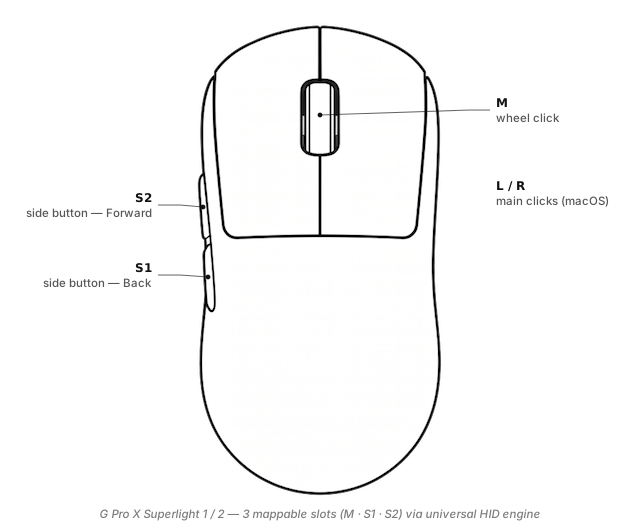
What you can actually map on the G Pro X Superlight
The Superlight is a minimal five-button mouse; LinguaX exposes its mappable inputs as named slots:
S1/S2(side buttons) — the two thumb-side buttons. Default is Back / Forward. Click-based mapping via LinguaX's universal HID engine works today; richer gesture types (long-press / directional swipe) roll out with model recognition.M(wheel click) — the middle button.- Left / Right click — handled by macOS directly; usually no need to remap.
Under the mouse there is a DPI-cycle button used for on-the-fly DPI switching in G HUB profiles. LinguaX doesn't currently rebind that specific button — it's reserved for the mouse's own DPI toggle.
For the full slot vocabulary see Button & Side-Button Mapping.
Why remap a gaming mouse on Mac
- You spend more time in Slack than in Overwatch. Two side buttons at Back / Forward is a waste when they could be push-to-talk and screenshot.
- G HUB is heavy. Electron, sign-in prompt, background daemons — for a mouse that only needs desk-work mapping, LinguaX's ~10 MB native footprint is a better fit.
- Gaming performance stays intact. LinguaX only touches side-button events; pointer input, DPI, and polling rate go straight through untouched.
- Cross-mouse consistency. If you also have an MX Master at home, LinguaX gives you the same named slots (Side 1, Side 2) across both — same recipes work on either.
For a broader mouse-tool comparison: Mos vs LinearMouse vs Mac Mouse Fix.
Three ready-to-copy setups
1. Push-to-talk on S2
Since the Superlight has no Thumb button, use S2 for push-to-talk. On the universal HID engine, tap-to-toggle is the reliable path today:
S2 click→ Toggle your voice tool's dictation (tap once to start, again to stop)- Or bind
S2 clickto a global voice tool's hold-to-talk key and press once to start, once to end - Long-press / swipe gesture types are on the roadmap for this model
Details: Push-to-Talk Voice Typing on Mac with a Mouse Button.
2. Space switching via click (swipe pending model recognition)
Since directional swipe requires HID++ model recognition (roadmap):
- Bind a keyboard shortcut to a Karabiner / Hammerspoon macro that cycles Spaces, then trigger via
S1 clickorM click - Or wait for the Superlight to join the LinguaX recognition list, at which point
S1 swipe-left/swipe-right→⌃ ←/⌃ →becomes a one-step recipe
3. App-scoped click triggers
LinguaX's per-app overrides work on the universal HID engine — same side-button click, different action based on the frontmost app:
- In Zoom:
S2 click→ Mute toggle - In your browser:
S2 click→ Reopen closed tab (⌘ ⇧ T) - Global:
S2 click→ Forward
Configuration reference: App-Scoped Overrides.
Setup in three minutes
- Install LinguaX from Installation.
- Connect the Superlight. Plug in the Lightspeed receiver, or pair over Bluetooth if you have the "Superlight 2" variant. Never paired the receiver before? Our in-browser pairing tool supports Lightspeed re-pairing without G HUB.
- Open Mouse+. LinguaX picks up the Superlight; assign gestures to Side 1 / Side 2 / Wheel click.
- Apply a recipe. Push-to-talk on a gaming mouse is disproportionately useful — try that one first.
G HUB vs LinguaX on macOS
| G HUB | LinguaX | |
|---|---|---|
| App size | Hundreds of MB (Electron + agents) | ~10 MB native |
| Account | Prompted at first launch | None ever |
| Side-button click mapping | Yes | Yes |
| Long-press gesture | No | Coming with model recognition |
| Directional-swipe gesture | No | Coming with model recognition |
| Per-app overrides | Limited, needs profile switching | Automatic by bundle ID |
| DPI on-mouse toggle | Yes | Not touched — mouse's own DPI button stays |
| Non-Logitech mice | Not supported | Any brand |
If you use G HUB purely for macros in one specific game, keep it. If you use it for desk-work side-button mapping on macOS, LinguaX covers that with far less overhead.
Compatibility notes
- Lightspeed receiver — supported via WebHID and via LinguaX's mapping engine.
- Bluetooth — supported on the Superlight 2; the original Superlight is Lightspeed-only.
- Battery reading — not yet available for this model in LinguaX (see the info tip above); coming when the model joins the deeper HID++ recognition list.
- Sleep / wake — pointer wakes normally; side-button mappings re-apply after wake.
- Gaming impact — LinguaX side-button interception adds negligible latency; DPI / polling rate / raw pointer stream unchanged.
FAQ
Does the G Pro X Superlight work on Mac without G HUB? Yes. macOS handles pointer / click natively; LinguaX adds side-button mapping without G HUB.
Can I turn a gaming mouse into a productivity mouse? Yes — Side 1 / Side 2 with LinguaX's four gesture types (click / double / long-press / swipe) is enough for push-to-talk, Spaces switching, or app-scoped shortcuts.
Does LinguaX support the Lightspeed receiver? Yes for basic mapping; the in-browser pairing tool also supports Lightspeed re-pairing.
Will LinguaX affect gaming performance? No. Pointer stream is untouched; only side-button events are intercepted, with negligible latency.
Get started
LinguaX is a free download with a 30-day trial — no account, no telemetry. If it fits, it is a $9.9 one-time purchase covering 3 devices (no subscription).
Download LinguaX and remap your Superlight free for 30 days.
Related pages
- G Pro X Superlight 2 — 2024 refresh; Bluetooth added.
- MX Master 3S — desktop-first mouse with more slots if you want Thumb / SM / Wheel Tilt.
- Comparing mouse tools on Mac? Mos vs LinearMouse vs Mac Mouse Fix.
- All models: Compatible Mouse Models overview.