MX Anywhere 3S on Mac — Portable Mouse, Full Mapping
The MX Anywhere 3S is the travel-sized cousin of the MX Master 3S — no Thumb button, no Wheel Tilt sensors, but the four inputs it does have get every LinguaX gesture type. Push-to-talk on a side button, Space switching by swipe, per-app input-source switching — all fit on a mouse you can slip in a laptop bag.
What you can actually map on the MX Anywhere 3S
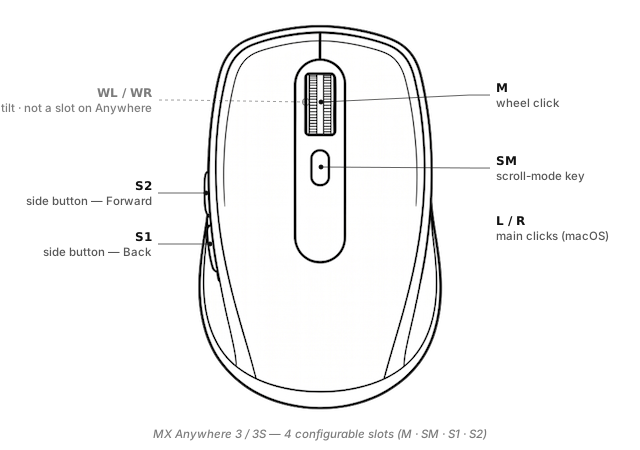
LinguaX exposes four configurable inputs on the Anywhere 3S, plus Left / Right which macOS handles directly:
S1/S2(side buttons) — the two thumb-side buttons (default Back / Forward). Full four-gesture layer: click / double-click / long-press / directional swipe.M(wheel click) — the middle button.SM(Scroll Mode) — the small button behind the wheel that toggles MagSpeed between ratchet and free-spin. LinguaX lets SM carry a second action while still toggling wheel mode.
The Anywhere 3S has no dedicated Thumb button (that is exclusive to the MX Master line), and no Wheel Tilt — the wheel presses down for a middle-click but does not tilt sideways.
Named-slot vocabulary reference: Button & Side-Button Mapping.
What Options+ can't do on the Anywhere 3S
Even with fewer buttons than a MX Master, LinguaX still gives you what Options+ leaves on the table:
- Push-to-talk on a side button — long-press with a 200 ms threshold as a physical PTT switch.
- Four-direction swipe on the side buttons — Options+ fires on press; LinguaX distinguishes swipe-left / -right / -up / -down as four independent actions.
- Per-app overrides by bundle ID — same side button, different action per app. See App-Scoped Overrides.
- Modifier-hold — treat a side button as "held Cmd" while pressed.
- No account, no cloud sync, ~10 MB native.
Broader writeup: Logi Options+ Alternative for macOS.
Three ready-to-copy setups for a portable mouse
1. Push-to-talk on S2
Since the Anywhere line has no Thumb button, use S2 (Forward) for PTT — Forward is less muscle-critical than Back for most browsing habits:
S2 long-press(200 ms) → Hold the shortcut your voice tool uses (SuperwhisperFn, Wispr Flow⌥, ZoomSpace)S2 click→ keep Forward for browsing (short click still fires the default)
Details: Push-to-Talk Voice Typing on macOS with a Mouse Button.
2. Space switching with S1 swipe
S1 swipe-left→⌃ ←(Space left)S1 swipe-right→⌃ →(Space right)S1 click→ keeps default Back action
Two or more Spaces reachable with a thumb flick, no reach to the trackpad or keyboard.
3. App-scoped side-button behaviour
Same button, different action depending on the frontmost app:
- Global:
S2 click→ Forward - In Zoom:
S2 click→ Mute toggle - In your browser:
S2 double-click→ Reopen closed tab (⌘ ⇧ T)
Configuration reference: App-Scoped Overrides.
Setup in three minutes
- Install LinguaX from Installation.
- Pair the mouse. For travel, Bluetooth is usually better — no dongle to lose. Pair via macOS System Settings; the Anywhere 3S supports three Easy-Switch slots so you can also pair a Bolt receiver at a permanent desk.
- Open Mouse+. LinguaX recognises the Anywhere 3S via VID:PID and shows the S1 / S2 / M / SM slots.
- Apply a recipe. Start with push-to-talk on S2 — it is the biggest productivity win a portable mouse can offer.
The First Run guide covers accessibility-permission prompts on macOS.
MX Anywhere 3S vs the MX Master line
| MX Anywhere 3S | MX Master 3S | |
|---|---|---|
| Weight | Lighter, pocketable | Full-size desktop |
| Configurable slots | 4 (S1, S2, M, SM) | 7 (S1, S2, M, T, SM, WL, WR) |
| Thumb button | No | Yes (T) |
| Wheel Tilt | No | Yes (WL / WR) |
| Portability | High | Desk-only |
If your workflow is mostly stationary, the MX Master 3S gives you three extra mappable inputs. If you carry a laptop bag, the Anywhere 3S trades those slots for portability — the four it has still cover push-to-talk, Spaces, and per-app overrides.
Compatibility notes
- HID++ 2.0 — recognised natively with full profile support.
- Battery — shown in the tray for both Bluetooth and Bolt connections.
- Sleep / wake — auto-recovers.
- Three Easy-Switch hosts — LinguaX keeps a separate profile per host.
FAQ
Does the MX Anywhere 3S have a Thumb button? No — the Anywhere line drops the Thumb button that MX Master models have. Four configurable inputs: S1, S2, M, SM.
Can I still do push-to-talk on the Anywhere 3S? Yes — bind long-press to S2 (Forward, less-used than Back). Same 200 ms threshold as the Master line.
Bluetooth or Bolt receiver for a portable mouse? Bluetooth for travel (no dongle to lose), Bolt for a permanent desk. The Easy-Switch button toggles paired hosts.
Does LinguaX show battery for the Anywhere 3S? Yes, via HID++ over Bluetooth or via the Bolt receiver.
Get started
LinguaX is a free download with a 30-day trial — no account, no telemetry. If it fits, it is a $9.9 one-time purchase covering 3 devices (no subscription).
Download LinguaX and set up your MX Anywhere 3S free for 30 days.
Related pages
- MX Anywhere 3 — the previous-generation model; same slot layout.
- MX Master 3S — the larger desktop-first sibling with T, SM, WL, WR.
- MX Master 3 — desktop, older generation, same seven-slot mapping surface.
- How to Map Mouse Side Buttons on macOS — brand-agnostic side-button walkthrough; every gesture pattern shown there applies to Anywhere 3S's S1 and S2.
- All models: Compatible Mouse Models overview.