MX Master 4 on Mac — Full Control with LinguaX
The MX Master 4 is Logitech's 2025 flagship — same familiar shell as the 3S plus one new input, the Actions Ring, sitting under the index finger. On macOS, Logi Options+ hides most of the button surface behind app profiles. LinguaX gives you all ten mappable inputs directly, with per-app overrides, gesture layers, and push-to-talk on the Gesture button.
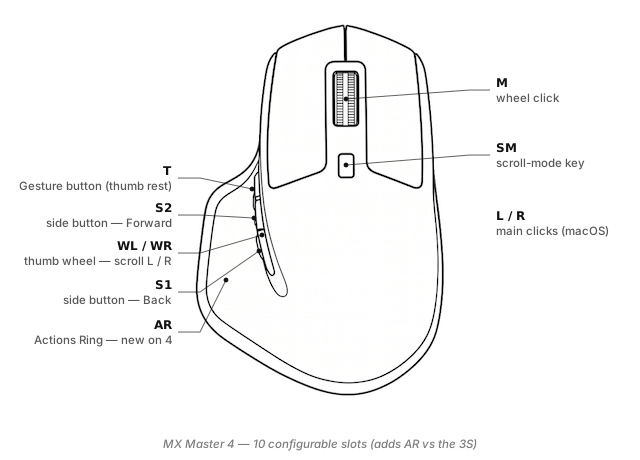
What you can map on the MX Master 4
Ten LinguaX slots — the same nine as the 3S, plus AR:
- Side 1 / Side 2 — the two thumb-side buttons. Default is Back / Forward.
- T (Gesture button) — the flat button behind the thumb rest. Logitech renamed the "Thumb button" to "Gesture button" on the 4; LinguaX still exposes it as
T. Supports click, double-click, long-press, and four-directional swipe. - AR (Actions Ring key) — new to the MX Master 4. Sits on top of the shell under the index finger. LinguaX treats it as a standard mappable slot with the full gesture layer, so anything you'd put on a side button works here — with the ergonomic advantage that the index finger doesn't have to leave its resting position.
- WL / WR (thumb wheel) — the horizontal thumb wheel above the side buttons. Reports as
AC Panhorizontal scroll; LinguaX reads left and right ticks as discrete buttons. - SM (Scroll Mode) — the small button behind the wheel that switches between ratchet and free-spin MagSpeed. LinguaX lets SM carry a second action while still toggling wheel mode.
- Wheel click — the middle button.
Every slot supports the full gesture layer (click / double-click / long-press / directional swipe), so a single physical button can carry three or four distinct actions. See Gesture Mapping.
What Options+ can't do here
- Push-to-talk. Options+ has no "hold to speak, release to stop." LinguaX's long-press gesture on the Gesture button (or on AR) is a full physical PTT switch for Superwhisper, Wispr Flow, Zoom, Discord, or macOS Dictation.
- Directional swipe on Actions Ring. Options+ ties AR to context profiles it maintains itself. LinguaX makes AR just another slot — swipe left / right / up / down each fires a different action, with an on-screen indicator while you drag.
- Per-app overrides by bundle ID. Options+ needs the target app to be actively supported. LinguaX overrides by bundle ID whether the app is "recognised" or not. See App-scoped Overrides.
- Modifier-hold. Treat Side 1 or AR as "held Cmd" while pressed, so
Cmd-click flows work one-handed. - No account, no background service. Options+ pesters you to sign in and runs Electron in the background. LinguaX is ~10 MB native and stores no cloud state.
Broader writeup: Logi Options+ Alternative for macOS.
Three ready-to-copy setups
1. Push-to-talk on the Gesture button
The Gesture button on the 4 sits exactly where a mechanical PTT switch would go on a headset. The long-press gesture with a 200 ms threshold turns it into one:
- In Mouse+, pick your MX Master 4 from the device list.
- Assign
T long-press→ Hold the shortcut your voice tool uses (Superwhisper defaults toFn; Wispr Flow uses⌥; Zoom's PTT isSpacewhen muted). - Optionally assign
T clickto a "quick capture" note action so a single tap does something too.
Full setup with app choices: Push-to-Talk on Mac Without a Keyboard.
2. Bind Actions Ring to your most-used shortcut
AR sits under the index finger — the fastest button on the mouse to reach without moving the hand. Put your single most-frequent action here:
- Global:
AR click→ your launcher (Raycast, Alfred, Spotlight) AR long-press→ screenshot to clipboard (⌃ ⇧ ⌘ 4)AR swipe-up/swipe-down→ volume up / down
Because AR is a fresh slot the muscle memory is a blank slate — good candidate for whatever shortcut you keep meaning to learn but never do.
3. Switch macOS Spaces with a side-button swipe
Same recipe as the 3S — the 4's Side 1 sits at the same angle:
Side 1 swipe-left→⌃ ←(Space left)Side 1 swipe-right→⌃ →(Space right)Side 1 click→ Back (keep the default so you don't lose Back navigation)
Setup in three minutes
- Install LinguaX. Download the ~10 MB build from Installation and drag it to Applications.
- Connect the MX Master 4. Either pair over Bluetooth in System Settings, or plug in a Bolt receiver. New Bolt receiver? Use the in-browser pairing tool — no Options+ install needed.
- Open Mouse+. LinguaX picks up the 4 automatically and shows all ten named slots, AR included.
- Apply a recipe. Start with one of the three above. Refine over the next few sessions.
First-time permission prompts are covered in First Run.
MX Master 4 vs MX Master 3S
| MX Master 4 | MX Master 3S | |
|---|---|---|
| Configurable slots | 10 (adds AR) | 9 |
| Actions Ring | Yes (AR) | — |
| Gesture / Thumb button | Yes (T, renamed "Gesture button") | Yes (T, "Thumb button") |
MagSpeed wheel + SM | Yes | Yes |
Thumb wheel (WL / WR) | Yes | Yes |
| DPI | Up to 8000 | Up to 8000 |
| Battery (LinguaX tray) | Yes (BLE + Bolt) | Yes (BLE + Bolt) |
If you're already comfortable on the 3S, moving to the 4 is a pure superset — every recipe you use still applies, with AR as a bonus slot.
Compatibility notes
- Firmware: LinguaX reads HID++ 2.0 from any 4 firmware Logitech has shipped. AR is exposed as a standard mappable slot; no separate firmware unlock.
- Battery reading: Shown in the tray over Bluetooth and Bolt.
- Sleep / wake: Auto-reconnects after macOS sleep; mappings re-apply without a manual reload.
- Multi-host: The 4's Easy-Switch button toggles between three paired hosts; LinguaX keeps a separate profile per host.
FAQ
Does the MX Master 4 work on macOS without Logi Options+? Yes. macOS handles movement and clicking out of the box. LinguaX adds proper Side, Gesture, Scroll Mode, wheel tilt, and Actions Ring mapping without a Logitech account or Electron background service.
What is the Actions Ring on the MX Master 4?
A new input on top of the shell, under the index finger. In LinguaX it's the AR slot — a plain mappable button with the same gesture layer as any other Mouse+ slot.
What's different between MX Master 4 and MX Master 3S?
Same physical layout — thumb rest, MagSpeed wheel, thumb wheel, Gesture button — plus one new input, Actions Ring (AR). Everything you can map on the 3S maps on the 4; AR is the addition.
Bluetooth or Bolt receiver on Mac? For one Mac, Bluetooth is simpler. If you swap Macs or want cleaner sleep/wake recovery, the Bolt is more predictable. LinguaX reads full HID++ over both.
How many devices can I pair to one Bolt receiver? Six per receiver. Hit the limit and you'll need to unpair an unused device — LinguaX's in-browser pairing tool can unpair as well as pair, no Logitech software required.
Get started
LinguaX is a free download with a 30-day trial — no account, no telemetry. If it fits, it is a $9.9 one-time purchase covering 3 devices (no subscription).
Download LinguaX and set up your MX Master 4 free for 30 days.
Related pages
- Coming from Logi Options+? The MX Master 3S migration guide applies to the 4 with the AR addition on top.
- First time mapping side buttons? How to Map Mouse Side Buttons on macOS covers the click/double/long-press/swipe gesture set and per-app override pattern that also drives the AR button.
- MX Master 3S — previous generation. Same shell and gestures, minus AR.
- MX Master 3 — two generations back. Louder wheel, lower max DPI.
- MX Anywhere 3S — travel-sized sibling. No AR, no thumb wheel, no Gesture button.
- All supported models: Compatible Models overview.