Logi Lift on Mac — Vertical Mouse, Side-Button Mapping
The Logi Lift's 57-degree vertical angle is what draws most Mac users to it — a neutral wrist position that reduces pronation strain over an 8-hour workday. LinguaX has the Lift on its recognition list with full HID++ 2.0, so the side buttons and the DPI key on top all get click / long-press / directional-swipe gestures and per-app overrides — without Logi Options+ installed.
What you can actually map on the Logi Lift
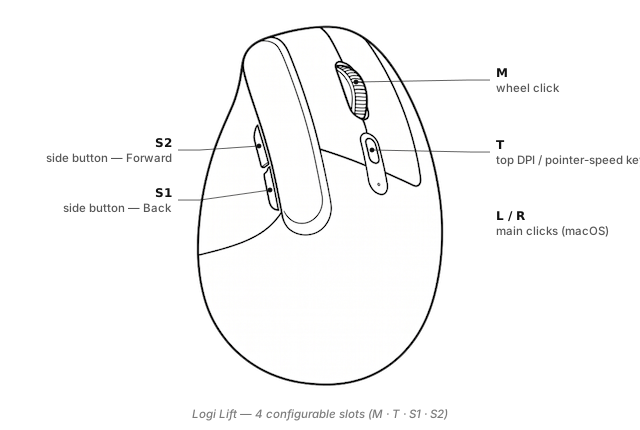
LinguaX exposes four configurable inputs on the Lift, plus L / R which macOS handles directly:
S1/S2(side buttons) — the two thumb-side buttons (default Back / Forward). Full four-gesture layer: click / double-click / long-press / directional swipe.M(wheel click) — the middle button.T(DPI / Pointer Speed key) — the small button on top of the mouse, behind the wheel. Default action is DPI toggle; LinguaX exposes it in the T slot so you can rebind it to any shortcut or gesture. If you do rebind, you lose the DPI toggle unless you keep that action on it.
Named-slot reference: Button & Side-Button Mapping. Gesture-type semantics: Gesture Mapping.
Why remap the Lift on Mac
The Lift is designed to reduce wrist and forearm strain. It doesn't reduce keyboard reach strain — that comes from constantly hitting shortcuts. Remapping the Lift's side buttons and top DPI key to your most-used shortcuts closes the ergonomics loop:
- Push-to-talk on S2 — voice input for anything text-heavy, so your fingers rest.
- Space switching on S1 swipe — no more
⌃ ←/⌃ →reaches. - Screenshot on T — hand stays on the mouse; you accept trading the DPI toggle for a much more useful action.
Broader ergonomics discussion in MX Ergo for the trackball alternative.
Three ready-to-copy setups
1. Push-to-talk on S2
For voice-first work:
S2 long-press(200 ms) → Hold your PTT key (SuperwhisperFn, Wispr Flow⌥, ZoomSpace)S2 click→ keep Forward for browsing
More: Push-to-Talk Voice Typing on Mac.
2. Space switching with S1 swipe
Avoid the ⌃ ← / ⌃ → keyboard reach:
S1 swipe-left→⌃ ←S1 swipe-right→⌃ →S1 click→ keeps default Back
3. Top DPI key → screenshot (trade DPI toggle for utility)
The T key on top is barely used once you pick a DPI you like. Reclaim it:
T click→⌘ ⇧ 4(macOS area screenshot)- Or
⌘ ⇧ 5(screenshot menu) for more options - Or
T long-press→ PTT key, keeping short click for DPI toggle
Full walkthrough: App-Scoped Overrides for making T do different things per app.
Setup in three minutes
- Install LinguaX from Installation.
- Pair the Lift. Bluetooth pairs in System Settings. If your Lift shipped with a Bolt receiver, the in-browser pairing tool can pair the receiver without Logi Options+.
- Open Mouse+. LinguaX picks up the Lift via VID:PID + HID++ probing; you'll see S1, S2, M, T.
- Apply a recipe. Push-to-talk on S2 pairs especially well with the Lift because voice input reduces the total time your wrist is engaged.
The First Run guide covers macOS permission prompts.
Compatibility notes
- HID++ 2.0 — full profile support.
- Vertical angle — 57 degrees; comfortable transition from a flat mouse after a couple of days.
- Left / right-handed variants — LinguaX exposes identical named slots on both (buttons are mirrored).
- Bluetooth + Bolt — both work with LinguaX.
- Battery — shown in the tray via HID++.
- Three Easy-Switch hosts — separate LinguaX profile per host.
FAQ
Does the Logi Lift work on Mac without Logi Options+? Yes — LinguaX has the Lift on its recognition list with full HID++ 2.0. Adds side-button and DPI-key mapping without Options+ installed.
What is the button on top of the Lift used for? DPI / Pointer Speed toggle by default. LinguaX exposes it as T so you can rebind — most users pick one DPI they like and reclaim T for a productivity action (screenshot, PTT, quick capture).
Left- or right-handed on Mac? Both — Logitech ships mirrored variants. LinguaX supports both with identical slot names.
Does LinguaX show battery for the Lift? Yes, via HID++ over Bluetooth or Bolt.
Get started
LinguaX is a free download with a 30-day trial — no account, no telemetry. If it fits, it is a $9.9 one-time purchase covering 3 devices (no subscription).
Download LinguaX and set up your Logi Lift free for 30 days.
Related pages
- MX Master 3S — larger desktop mouse with more slots (S1, S2, M, T, SM, WL, WR).
- MX Ergo — trackball alternative for zero wrist movement.
- Push-to-Talk on Mac with a Mouse Button — most-fitting workflow for ergonomic mice.
- On Options+ already? Logi Options+ Alternative for macOS.
- All models: Compatible Mouse Models overview.