G Pro X Superlight 2 on Mac — Same Side Buttons, More Range
The Superlight 2 keeps the exact same button layout as the original — two side buttons plus wheel click — while adding Bluetooth, USB-C, and a 32000-DPI sensor. LinguaX gives Mac users what G HUB stops short of: long-press gestures, four-direction swipes, and per-app overrides on those two side buttons, without needing G HUB installed.
The Superlight 2 receives basic side-button mapping via LinguaX's universal HID engine today. Deeper HID++ 2.0 profile support (battery reading via Lightspeed / Bluetooth, factory-default recognition) is planned for a future release — track the Changelog.
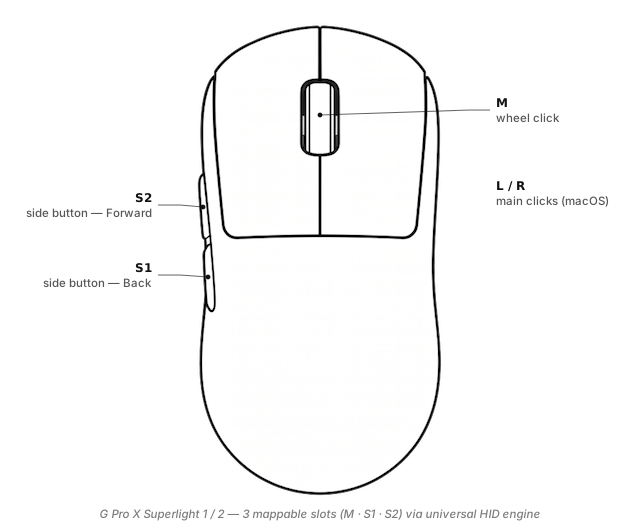
What you can actually map on the G Pro X Superlight 2
S1/S2(side buttons) — the two thumb-side buttons (default Back / Forward). Click-based mapping via LinguaX's universal HID engine works today; richer gesture types (long-press / directional swipe) roll out with model recognition.M(wheel click) — the middle button.- Left / Right click — handled natively by macOS.
The on-mouse DPI-cycle button under the shell is reserved for the mouse's own DPI toggle — LinguaX doesn't rebind it.
Full slot reference: Button & Side-Button Mapping.
What changed vs the original Superlight
The mapping surface is identical to the original; the differences are on the hardware side:
| Original Superlight | Superlight 2 | |
|---|---|---|
| Wireless | Lightspeed only | Lightspeed + Bluetooth |
| Cable | Micro-USB | USB-C |
| Sensor | Hero 25K (25 600 DPI) | Hero 2 (32 000 DPI) |
| Weight | 63 g | 60 g |
| Polling | 1000 Hz | 8000 Hz with G HUB |
| Button count | 5 (2 side + wheel click + L/R) | 5 (same) |
For LinguaX users, the practical Mac gains are: Bluetooth means no dongle to lose when travelling and USB-C means one cable in your bag. The mapping story is the same as the G Pro X Superlight — same two side buttons, same recipes.
Three ready-to-copy setups
1. Push-to-talk on S2
No Thumb button on the Superlight line — use S2. On the universal HID engine, tap-to-toggle is the reliable path today:
S2 click→ Toggle your voice tool's dictation (tap once to start, again to stop)- Long-press / swipe roll out with model recognition — see roadmap tip above
More: Push-to-Talk Voice Typing on Mac.
2. Space switching via click
Swipe requires HID++ recognition (roadmap). For now:
- Bind
S1 clickorM clickto a Karabiner / Hammerspoon macro that cycles Spaces - Or wait for
S1 swipe-left/swipe-right→⌃ ←/⌃ →when the Superlight 2 joins recognition
3. App-scoped click triggers
Per-app overrides work on the universal HID engine — same click, different action per app:
- In Zoom:
S2 click→ Mute - In your browser:
S2 click→ Reopen closed tab (⌘ ⇧ T) - Global:
S2 click→ Forward
Reference: App-Scoped Overrides.
Setup in three minutes
- Install LinguaX from Installation.
- Pick a connection mode. Lightspeed dongle for lowest-latency desk work, Bluetooth for travel, USB-C for both charging and wired input. LinguaX reads all three the same way.
- Open Mouse+. Assign gestures to Side 1 / Side 2 / Wheel click.
- Apply a recipe. Push-to-talk on Side 2 is the quickest single-button productivity win.
The First Run guide covers macOS permission prompts.
G HUB vs LinguaX for the Superlight 2 on Mac
| G HUB | LinguaX | |
|---|---|---|
| App size | Hundreds of MB | ~10 MB native |
| Account | Prompted | None |
| Long-press gesture | No | Coming with model recognition |
| Directional swipe | No | Coming with model recognition |
| Per-app overrides | Profile switching only | Automatic by bundle ID |
| Non-Logitech mice | Not supported | Any brand |
| 8000 Hz polling toggle | Yes | Handled by mouse firmware, unaffected |
Compatibility notes
- Lightspeed / Bluetooth / USB-C — LinguaX side-button mapping works over all three.
- Battery reading — not yet exposed for this model (see info tip); coming in a future release.
- 32 000 DPI sensor — LinguaX doesn't cap or scale DPI; your on-mouse setting stays.
- Sleep / wake — pointer wakes normally; mappings re-apply after wake.
- Gaming latency — LinguaX intercepts only side-button events; raw pointer / click path is untouched.
FAQ
Does the Superlight 2 work on Mac without G HUB? Yes — macOS handles it natively; LinguaX adds side-button mapping without G HUB.
What's new for Mac users vs the original Superlight? Bluetooth and USB-C. Button surface is unchanged, so mapping recipes transfer.
Can I use both Lightspeed and Bluetooth? Yes — independent connection modes; LinguaX reads identically across both.
Does LinguaX affect gaming performance? No — pointer stream is untouched.
Get started
LinguaX is a free download with a 30-day trial — no account, no telemetry. If it fits, it is a $9.9 one-time purchase covering 3 devices (no subscription).
Download LinguaX and remap your Superlight 2 free for 30 days.
Related pages
- G Pro X Superlight — original model; same button layout, Lightspeed only.
- MX Master 3S — desktop-first Logitech mouse with more slots.
- Comparing mouse tools on Mac? Mos vs LinearMouse vs Mac Mouse Fix.
- Mapping S1 / S2 for game-relevant actions? How to Map Mouse Side Buttons on macOS — click, double-click, long-press, directional swipe, per-app.
- All models: Compatible Mouse Models overview.