MX Anywhere 3 on Mac — Same Mapping Power as the 3S
The MX Anywhere 3 shares the same four-slot mapping surface as the 3S: two side buttons, the wheel click, and the Scroll Mode toggle. It is on the LinguaX recognition list with full HID++ 2.0, so long-press on the side buttons, per-app overrides, and battery reading all work. If you're deciding between keeping your 3 and upgrading to a 3S, the mapping surface is not a reason to upgrade.
What you can actually map on the MX Anywhere 3
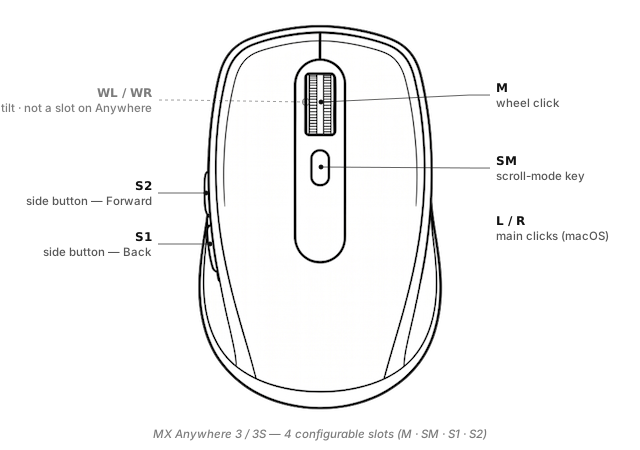
LinguaX exposes four configurable inputs on the Anywhere 3:
S1/S2(side buttons) — the two thumb-side buttons (default Back / Forward), with click / double-click / long-press / directional-swipe gestures.M(wheel click) — the middle button.SM(Scroll Mode) — the small button behind the wheel; toggles the MagSpeed wheel between ratchet and free-spin, and can carry a second action too.
The Anywhere line has no dedicated Thumb button (exclusive to MX Master models) and no Wheel Tilt — the wheel presses down for middle-click but does not tilt sideways.
Slot vocabulary reference: Button & Side-Button Mapping. Gesture-type semantics: Gesture Mapping.
What Options+ can't do here
- Push-to-talk on a side button (long-press as a physical PTT switch).
- Four-direction swipe on S1 / S2 (Options+ fires on press only).
- Per-app overrides by bundle ID — see App-Scoped Overrides.
- Modifier-hold on a side button.
- No account, no cloud sync, ~10 MB native.
Broader writeup: Logi Options+ Alternative for macOS.
Three ready-to-copy setups
1. Push-to-talk on S2
No Thumb button on the Anywhere line, so use S2 (Forward) — Forward is less muscle-critical than Back:
S2 long-press(200 ms) → Hold your voice tool's PTT key (SuperwhisperFn, Wispr Flow⌥, ZoomSpace)S2 click→ keep Forward for browsing
More: Push-to-Talk Voice Typing on Mac.
2. Spaces switching with S1 swipe
S1 swipe-left→⌃ ←S1 swipe-right→⌃ →S1 click→ keeps default Back
3. App-scoped side-button behaviour
- Global:
S2 click→ Forward - In Slack:
S2 click→ send message - In your code editor:
S2 double-click→ toggle sidebar
Full walkthrough: Auto-switch input source by app or domain on Mac.
Setup in three minutes
- Install LinguaX from Installation.
- Pair the mouse. Bluetooth for travel, Unifying / Bolt for permanent desks. New receiver? Pair without Options+ via the in-browser pairing tool.
- Open Mouse+. LinguaX picks up the Anywhere 3 via VID:PID + HID++ probing; you'll see S1, S2, M, SM.
- Apply a recipe. Push-to-talk on S2 is the quickest single-button productivity win.
The First Run guide walks through macOS permission prompts.
MX Anywhere 3 vs 3S — is upgrading worth it?
Software-wise, no. Same four configurable slots, same HID++ profile, same gesture types.
| MX Anywhere 3 | MX Anywhere 3S | |
|---|---|---|
| Weight | Same (99 g class) | Same |
| Max DPI | 4000 | 8000 |
| Tracking on glass | No | Yes |
| Click noise | Standard | Quieter |
| Bundled receiver | Unifying (older stock) or Bolt | Bolt |
Upgrade if you need silent clicks (open-plan office, shared spaces) or glass tracking. Otherwise keep the 3.
Compatibility notes
- HID++ 2.0 — full profile support.
- Battery — shown in the tray.
- Sleep / wake — auto-recovers.
- Three Easy-Switch hosts — separate LinguaX profile per host.
FAQ
Is the MX Anywhere 3 still worth using in 2026? Yes. Full LinguaX recognition, same mapping surface as the 3S. The 3S adds hardware polish (silent clicks, higher DPI), not mapping capabilities.
Does the MX Anywhere 3 have a Thumb button? No — Thumb is exclusive to the MX Master line. Four configurable slots on the Anywhere: S1, S2, M, SM.
Can I do push-to-talk? Yes — bind long-press to S2 (Forward is less used than Back for most habits).
Bluetooth or receiver? Bluetooth for travel, receiver for stationary. Both support full HID++.
Get started
LinguaX is a free download with a 30-day trial — no account, no telemetry. If it fits, it is a $9.9 one-time purchase covering 3 devices (no subscription).
Download LinguaX and set up your MX Anywhere 3 free for 30 days.
Related pages
- MX Anywhere 3S — newer sibling; identical four-slot mapping surface.
- MX Master 3 — desktop equivalent with T, SM, WL, WR.
- MX Master 3S — newest desktop model.
- On Options+ already? Migrate from Logi Options+ (MX Master 3S guide) — steps apply to the Anywhere line too.
- All models: Compatible Mouse Models overview.